Using Gemini in Apps Script
This has been a long time coming, and it is finally here. Apps Script now has a new Vertex AI advanced service!
⚠️⚠️ Important: In my testing, it is not possible to use Gemini 3 models, like gemini-3-pro-preview, because they are in preview. You can use the gemini-2.5-pro model instead.
Previously, if you wanted to call Gemini or other Vertex AI models, you had to manually construct UrlFetchApp requests, handle bearer tokens, and manage headers. It was doable, but verbose and annoying.
The Vertex AI Advanced Service
The new service, VertexAI, allows you to interact with the Vertex AI API directly. This means you can generate text, images, and more with significantly less boilerplate code. You can check out the full Vertex AI REST reference docs for more details on available methods and parameters.
Before: The Old Way
In my previous post on Using Vertex AI in Apps Script, the code looked like this:
function predict(prompt) {
  const URL = `${BASE}/v1/projects/${PROJECT_ID}/locations/us-central1/publishers/google/models/${MODEL}:predict`;
  const options = {
    method: "post",
    headers: { Authorization: `Bearer ${ACCESS_TOKEN}` },
    muteHttpExceptions: true,
    contentType: "application/json",
    payload: JSON.stringify(payload),
  };
  const response = UrlFetchApp.fetch(URL, options);
  // ... parsing logic ...
}
After: The New Way
Now, with the built-in service, it’s just:
const response = VertexAI.Endpoints.generateContent(payload, model);
// ... parsing logic ...
Prerequisites
To use the Vertex AI advanced service, you need to do the following, which you already did if your were using via UrlFetchApp:
Google Cloud Project: You need a Standard GCP Project (not the default Apps Script managed one).
Billing Enabled: Vertex AI requires a billing account attached to the project.
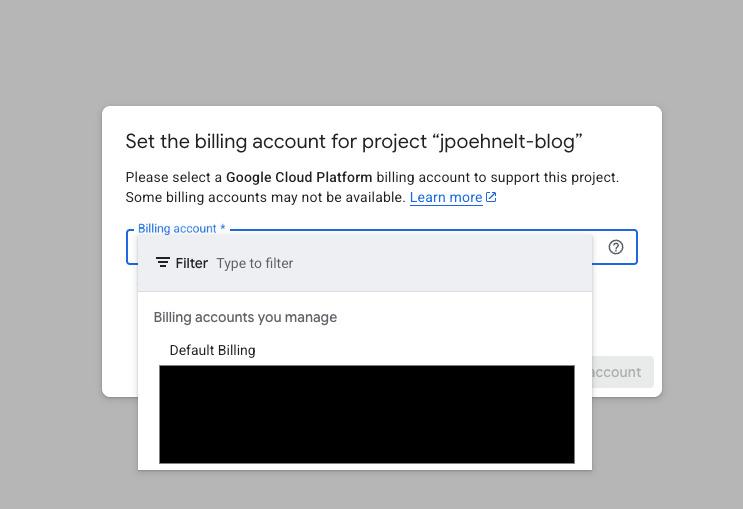
Enable Billing for Vertex AI
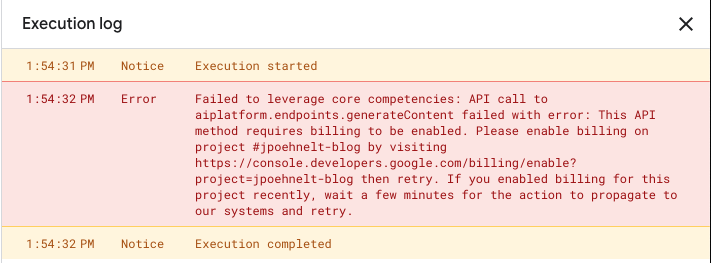
Failed to Leverage Core Competencies Enable Billing
Failed to leverage core competencies: API call to aiplatform.endpoints.generateContent failed with error: This API method requires billing to be enabled. Please enable billing on project … then retry.
API Enabled: Enable the Vertex AI API in your Cloud Console.
Apps Script Configuration: Add your Cloud Project number in Project Settings.
Add Service: Enable the Vertex AI advanced service in the “Services” section of the editor.
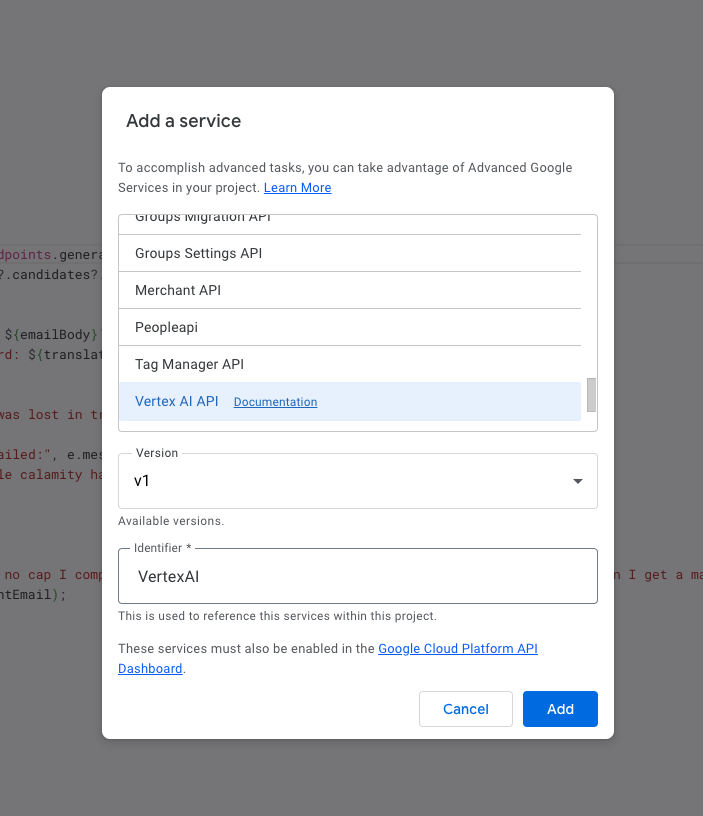
Add Vertex AI Service
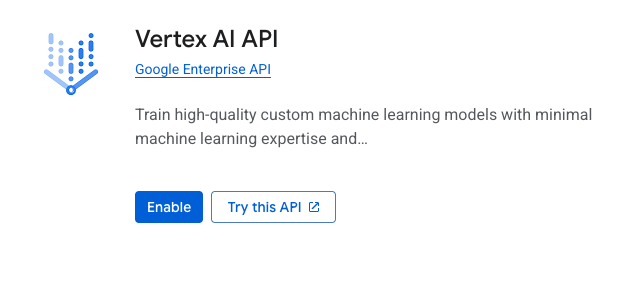
Enable Vertex AI Service
Or manually enable it in
appsscript.json:{ "timeZone": "America/Denver", "dependencies": { "enabledAdvancedServices": [ { "userSymbol": "VertexAI", "version": "v1", "serviceId": "aiplatform" } ] }, "exceptionLogging": "STACKDRIVER", "runtimeVersion": "V8" }
Code Snippet: The Gen Z Translator
To demonstrate the power of this service for educators, let’s build the “Gen Z” Translator. This tool takes student emails filled with slang and translates them into proper Victorian-era English, ensuring clear communication.
/**
 * Translates an email from "Gen Z" slang into proper Victorian English.
 * @param {string} emailBody - The student's email text (e.g., "no cap this exam was mid").
 * @return {string} The translated text suitable for a 19th-century gentleman or scholar.
 */
function translateGenZtoVictorian_(emailBody) {
  const PROJECT_ID = "your-project-id";
  const REGION = "us-central1";
  const MODEL =
    `projects/${PROJECT_ID}/locations/${REGION}` +
    `/publishers/google/models/gemini-2.5-flash`;

  const model = MODEL; // back-compat for this snippet logic

  const prompt = `
    You are a distinguished Victorian-era scholar and translator.
    Your task is to translate the following email, written in modern "Gen Z" slang,
    into formal, elegant Victorian English.

    Maintain the core meaning but completely change the tone to be exceedingly polite,
    verbose, and aristocratic.

    Student's Email: "${emailBody}"

    Victorian Translation:
  `;

  const payload = {
    contents: [
      {
        role: "user",
        parts: [{ text: prompt }],
      },
    ],
    generationConfig: {
      temperature: 0.7,
    },
  };

  try {
    const response = VertexAI.Endpoints.generateContent(payload, model);
    const translation = response?.candidates?.[0]?.content?.parts?.[0]?.text;

    if (translation) {
      console.log(`Student said: ${emailBody}`);
      console.log(`Professor heard\n\n: ${translation}`);
      return translation;
    }
    return "Error: The telegram was lost in transit.";
  } catch (e) {
    console.error("Translation failed:", e.message);
    return "Error: An unfathomable calamity has occurred.";
  }
}

function runTranslatorDemo() {
  const studentEmail =
    "Hey prof, that lecture today was straight fire. The vibes were immaculate and I'm lowkey obsessed with this topic. Slay.";
  translateGenZtoVictorian_(studentEmail);
}
The result:
3:35:40 PM	Notice	Execution started
3:36:02 PM	Info	Student said: Hey prof, that lecture today was straight fire. The vibes were immaculate and I'm lowkey obsessed with this topic. Slay.
3:36:02 PM	Info	Professor heard

My Dearest Professor,

Permit me to express, with the utmost sincerity, my profound admiration for your discourse this day. It was a truly masterful and illuminating exposition, delivered with a passion that can only be described as incandescent.

The intellectual atmosphere you so deftly cultivated within the hall was of the most superlative quality; a veritable feast for the mind. Indeed, I confess that you have awakened within me a most fervent and, I daresay, burgeoning obsession with the subject matter, a fascination I had not previously known myself to possess.

It was, in all respects, a triumph of scholarly erudition.

I have the honour to remain, Sir,
Your most humble and devoted student.
3:36:02 PM	Notice	Execution completed
Code Snippet: Corporate Jargon Generator
And if you need to translate in the other direction—from simple human emotion to soul-crushing business speak—we have you covered too. This snippet does the exact opposite, turning honest phrases into “synergistic deliverables.”
/**
 * Generates corporate jargon from a simple phrase using Gemini.
 * @param {string} simplePhrase - The simple phrase to translate (e.g., "I'm going to lunch").
 * @return {string} The corporate jargon version.
 */
function prioritizeSynergy_(simplePhrase) {
  const PROJECT_ID = "your-project-id";
  const REGION = "us-central1";
  const MODEL =
    `projects/${PROJECT_ID}/locations/${REGION}` +
    `/publishers/google/models/gemini-2.5-flash`;

  const model = MODEL;

  const prompt = `
    Rewrite the following simple phrase into overly complex, cringeworthy corporate jargon.
    Make it sound like a LinkedIn thought leader who just discovered a thesaurus.

    Simple phrase: "${simplePhrase}"
  `;

  const payload = {
    contents: [
      {
        role: "user",
        parts: [{ text: prompt }],
      },
    ],
    generationConfig: {
      temperature: 0.9, // Max creativity for max cringe
    },
  };

  try {
    const response = VertexAI.Endpoints.generateContent(payload, model);

    // Safety check just in case the AI refuses to be that annoying
    const jargon = response?.candidates?.[0]?.content?.parts?.[0]?.text;

    if (jargon) {
      console.log(`Original: ${simplePhrase}`);
      console.log(`Corporate:\n\n${jargon}`);
      return jargon;
    } else {
      return "Error: Synergy levels critical. Please circle back.";
    }
  } catch (e) {
    console.error("Failed to leverage core competencies:", e.message);
    return "Error: Blocker identified.";
  }
}

function runDemo() {
  prioritizeSynergy_("I made a mistake.");
  prioritizeSynergy_("Can we meet later?");
  prioritizeSynergy_("I need a raise.");
}
The result:
3:29:25 PM	Notice	Execution started
3:29:32 PM	Info	Original: I made a mistake.
3:29:32 PM	Info	Corporate:

It has come to my attention, through rigorous self-assessment and a steadfast commitment to continuous improvement, that a momentary lapse in strategic foresight led to a suboptimal outcome, which I am now diligently leveraging as a foundational catalyst for enhanced future performance metrics.
3:29:41 PM	Info	Original: Can we meet later?
3:29:41 PM	Info	Corporate:

Considering the dynamic parameters of our current operational cadence, might we strategically align our respective bandwidths for a high-impact ideation interface at a mutually agreeable, post-meridian temporal increment?
3:29:52 PM	Info	Original: I need a raise.
3:29:52 PM	Info	Corporate:

In order to strategically galvanize optimal human capital resource allocation and ensure the continued, robust realization of enterprise-wide objectives, it is incumbent upon us to engage in a proactive, granular analysis of my present remuneration scaffolding, thereby effectuating an equitable recalibration commensurate with my demonstrably amplified value proposition and pivotal synergistic contributions.
3:29:53 PM	Notice	Execution completed
Multimodal Magic
Text is great, but Gemini is multimodal. You can pass images directly to the model to have it analyze charts, describe photos, or even read handwriting.
/**
 * Analyzes an image using Gemini's multimodal capabilities.
 * @param {string} base64Image - The base64 encoded image string.
 * @param {string} mimeType - The mime type of the image (e.g., "image/jpeg").
 * @return {string} The model's description of the image.
 */
function analyzeImage_(data, mimeType) {
  const PROJECT_ID = "your-project-id";
  const REGION = "us-central1";
  const MODEL =
    `projects/${PROJECT_ID}/locations/${REGION}` +
    `/publishers/google/models/gemini-2.5-flash`;

  const model = MODEL;
  const payload = {
    contents: [
      {
        role: "user",
        parts: [
          { text: "Succintly describe what is happening in this image." },
          {
            inlineData: {
              mimeType,
              data,
            },
          },
        ],
      },
    ],
    generationConfig: {
      maxOutputTokens: 4096,
    },
  };

  try {
    const response = VertexAI.Endpoints.generateContent(payload, model);
    const description = response?.candidates?.[0]?.content?.parts?.[0]?.text;
    console.log(description);
    return description;
  } catch (e) {
    console.error("Analysis failed:", e.message);
    return "Error: Could not see the image.";
  }
}

function runMultimodalDemo() {
  // Fetch an image from the web (or Drive)
  const imageUrl =
    "https://media.githubusercontent.com/media/jpoehnelt/blog/refs/heads/main/apps/site/src/lib/images/mogollon-monster-100/justin-poehnelt-during-ultramarathon.jpeg";
  const imageBlob = UrlFetchApp.fetch(imageUrl).getBlob();
  const base64Image = Utilities.base64Encode(imageBlob.getBytes());
  const mimeType = imageBlob.getContentType() || "image/jpeg";
  analyzeImage_(base64Image, mimeType);
}
The result:
3:26:28 PM	Notice	Execution started
3:26:40 PM	Info	A male trail runner, competing in a mountain ultramarathon with bib number 49, uses trekking poles to ascend a steep and rocky path.
3:26:40 PM	Notice	Execution completed
Important Patterns
Beyond simple text generation, the Vertex AI service supports powerful patterns that make your Apps Script integrations more robust and capable.
Structured Output
Use responseSchema to force Gemini to return valid JSON matching your exact specification. Docs →
/**
 * Force Gemini to return valid JSON matching your schema.
 */
function analyzeWithSchema(text) {
  const PROJECT_ID = "your-project-id";
  const REGION = "us-central1";
  const MODEL =
    `projects/${PROJECT_ID}/locations/${REGION}` +
    `/publishers/google/models/gemini-2.5-flash`;

  const payload = {
    contents: [
      {
        role: "user",
        parts: [{ text: `Analyze: "${text}"` }],
      },
    ],
    generationConfig: {
      responseMimeType: "application/json",
      responseSchema: {
        type: "object",
        properties: {
          sentiment: {
            type: "string",
            enum: ["positive", "negative", "neutral"],
          },
          topics: {
            type: "array",
            items: { type: "string" },
          },
          confidence: { type: "number" },
        },
        required: ["sentiment", "topics", "confidence"],
      },
    },
  };

  const response = VertexAI.Endpoints.generateContent(payload, MODEL);
  return JSON.parse(response.candidates[0].content.parts[0].text);
}
Google Search Grounding
Enable Google Search to get real-time information with citations. Docs →
/**
 * Enable Google Search for real-time info with citations.
 */
function searchGrounded(query) {
  const PROJECT_ID = "your-project-id";
  const REGION = "us-central1";
  const MODEL =
    `projects/${PROJECT_ID}/locations/${REGION}` +
    `/publishers/google/models/gemini-2.5-flash`;

  const payload = {
    contents: [
      {
        role: "user",
        parts: [{ text: query }],
      },
    ],
    tools: [{ googleSearch: {} }],
  };

  const response = VertexAI.Endpoints.generateContent(payload, MODEL);
  const candidate = response.candidates[0];
  const meta = candidate.groundingMetadata;

  return {
    text: candidate.content.parts[0].text,
    sources: meta?.groundingChunks || [],
    queries: meta?.webSearchQueries || [],
  };
}
System Instructions & Multi-turn Chat
Define persistent persona and rules. Pass conversation history for multi-turn. Docs →
/**
 * Set persistent persona/rules with systemInstruction.
 */
function queryWithSystem(prompt) {
  const PROJECT_ID = "your-project-id";
  const REGION = "us-central1";
  const MODEL =
    `projects/${PROJECT_ID}/locations/${REGION}` +
    `/publishers/google/models/gemini-2.5-flash`;

  const payload = {
    systemInstruction: {
      parts: [
        {
          text: `You are a helpful assistant. Be concise.
Use bullet points for lists.`,
        },
      ],
    },
    contents: [
      {
        role: "user",
        parts: [{ text: prompt }],
      },
    ],
  };

  const response = VertexAI.Endpoints.generateContent(payload, MODEL);
  return response.candidates[0].content.parts[0].text;
}

/**
 * Multi-turn: pass conversation history in contents.
 */
function chat(history, message) {
  const PROJECT_ID = "your-project-id";
  const REGION = "us-central1";
  const MODEL =
    `projects/${PROJECT_ID}/locations/${REGION}` +
    `/publishers/google/models/gemini-2.5-flash`;

  history.push({
    role: "user",
    parts: [{ text: message }],
  });

  const response = VertexAI.Endpoints.generateContent(
    { contents: history },
    MODEL,
  );
  const reply = response.candidates[0].content.parts[0].text;

  history.push({
    role: "model",
    parts: [{ text: reply }],
  });

  return { reply, history };
}
Safety Settings
Adjust content filtering thresholds for your use case. Docs →
/**
 * Adjust content filtering thresholds.
 * Thresholds: BLOCK_LOW_AND_ABOVE, BLOCK_MEDIUM_AND_ABOVE,
 *             BLOCK_ONLY_HIGH, BLOCK_NONE
 */
function queryWithSafety(prompt) {
  const PROJECT_ID = "your-project-id";
  const REGION = "us-central1";
  const MODEL =
    `projects/${PROJECT_ID}/locations/${REGION}` +
    `/publishers/google/models/gemini-2.5-flash`;

  const payload = {
    contents: [
      {
        role: "user",
        parts: [{ text: prompt }],
      },
    ],
    safetySettings: [
      {
        category: "HARM_CATEGORY_HARASSMENT",
        threshold: "BLOCK_ONLY_HIGH",
      },
      {
        category: "HARM_CATEGORY_HATE_SPEECH",
        threshold: "BLOCK_ONLY_HIGH",
      },
      {
        category: "HARM_CATEGORY_SEXUALLY_EXPLICIT",
        threshold: "BLOCK_ONLY_HIGH",
      },
      {
        category: "HARM_CATEGORY_DANGEROUS_CONTENT",
        threshold: "BLOCK_ONLY_HIGH",
      },
    ],
  };

  const response = VertexAI.Endpoints.generateContent(payload, MODEL);
  const candidate = response.candidates[0];

  if (candidate.finishReason === "SAFETY") {
    return { blocked: true, ratings: candidate.safetyRatings };
  }
  return { blocked: false, text: candidate.content.parts[0].text };
}
More Use Case Examples (2026-02-02)
Now that calling Gemini is significantly easier, here are five practical ideas to get you started.
1. Automated Form Response Processor
While Sheets now has a built-in =AI() function for simple prompts, Apps Script unlocks event-driven automation. This example triggers on form submissions, analyzes responses with Gemini, and writes enriched data back to your sheet—something =AI() can’t do.
/**
 * Analyze form responses with Gemini.
 * Set up an "On form submit" trigger.
 */
function onFormSubmit(e) {
  const PROJECT_ID = "your-project-id";
  const REGION = "us-central1";
  const MODEL =
    `projects/${PROJECT_ID}/locations/${REGION}` +
    `/publishers/google/models/gemini-2.5-flash`;

  const sheet = e.range.getSheet();
  const row = e.range.getRow();
  const feedback = e.values[2];

  const payload = {
    contents: [
      {
        role: "user",
        parts: [{ text: `Analyze: "${feedback}"` }],
      },
    ],
    generationConfig: {
      responseMimeType: "application/json",
      responseSchema: {
        type: "object",
        properties: {
          sentiment: {
            type: "string",
            enum: ["positive", "negative", "neutral"],
          },
          summary: { type: "string" },
          priority: {
            type: "string",
            enum: ["high", "medium", "low"],
          },
        },
        required: ["sentiment", "summary", "priority"],
      },
    },
  };

  const response = VertexAI.Endpoints.generateContent(payload, MODEL);
  const json = response.candidates[0].content.parts[0].text;
  const result = JSON.parse(json);

  sheet
    .getRange(row, 4, 1, 3)
    .setValues([[result.sentiment, result.summary, result.priority]]);
}
2. Automated Inbox Triage
Create a time-based trigger that runs every hour to summarize long email threads, apply urgency labels, and suggest actions.
/**
 * Triage unread emails. Run on a time-based trigger.
 */
function triageInbox() {
  const PROJECT_ID = "your-project-id";
  const REGION = "us-central1";
  const MODEL =
    `projects/${PROJECT_ID}/locations/${REGION}` +
    `/publishers/google/models/gemini-2.5-flash`;

  const threads = GmailApp.search("is:unread newer_than:1h", 0, 10);

  threads.forEach((thread) => {
    const msg = thread.getMessages().pop();
    const prompt = `Summarize and rate urgency (HIGH/MEDIUM/LOW):
From: ${msg.getFrom()}
Subject: ${thread.getFirstMessageSubject()}
Body: ${msg.getPlainBody().substring(0, 1000)}`;

    const payload = {
      contents: [
        {
          role: "user",
          parts: [{ text: prompt }],
        },
      ],
    };

    const response = VertexAI.Endpoints.generateContent(payload, MODEL);
    const analysis = response.candidates[0].content.parts[0].text;

    if (analysis.includes("HIGH")) {
      const label =
        GmailApp.getUserLabelByName("AI/Urgent") ||
        GmailApp.createLabel("AI/Urgent");
      thread.addLabel(label);
    }

    console.log(`${thread.getFirstMessageSubject()}: ${analysis}`);
  });
}
3. Drive File Organizer
Use multimodal capabilities to scan receipt images in Google Drive, extract metadata (vendor, date, amount), rename files, and organize them into category folders.
/**
 * Scan receipt images and rename with extracted metadata.
 */
function organizeReceipts() {
  const PROJECT_ID = "your-project-id";
  const REGION = "us-central1";
  const MODEL =
    `projects/${PROJECT_ID}/locations/${REGION}` +
    `/publishers/google/models/gemini-2.5-flash`;

  const folder = DriveApp.getFoldersByName("Receipts").next();
  const files = folder.getFiles();

  while (files.hasNext()) {
    const file = files.next();
    if (!file.getMimeType().startsWith("image/")) continue;

    const blob = file.getBlob();
    const base64 = Utilities.base64Encode(blob.getBytes());

    const payload = {
      contents: [
        {
          role: "user",
          parts: [
            { text: "Extract: vendor, date (YYYY-MM-DD), amount. JSON." },
            {
              inlineData: {
                mimeType: file.getMimeType(),
                data: base64,
              },
            },
          ],
        },
      ],
      generationConfig: { responseMimeType: "application/json" },
    };

    const response = VertexAI.Endpoints.generateContent(payload, MODEL);
    const json = response.candidates[0].content.parts[0].text;
    const data = JSON.parse(json);

    const newName = `${data.date}_${data.vendor}_${data.amount}.jpg`;
    file.setName(newName);
    console.log(`Renamed: ${newName}`);
  }
}
4. Doc Writing Assistant
Build a Docs sidebar that rewrites selected text in different styles—formal, casual, concise, or expanded.
/**
 * Rewrite selected text in Docs. Add menu via onOpen().
 */
function rewriteSelection(style) {
  const PROJECT_ID = "your-project-id";
  const REGION = "us-central1";
  const MODEL =
    `projects/${PROJECT_ID}/locations/${REGION}` +
    `/publishers/google/models/gemini-2.5-flash`;

  const doc = DocumentApp.getActiveDocument();
  const selection = doc.getSelection();
  if (!selection) {
    return DocumentApp.getUi().alert("Select text first.");
  }

  const el = selection.getRangeElements()[0];
  const text = el.getElement().asText();
  const start = el.getStartOffset();
  const end = el.getEndOffsetInclusive();
  const selected = text.getText().substring(start, end + 1);

  const styles = {
    formal: "Rewrite formally:",
    casual: "Rewrite casually:",
    concise: "Make concise:",
  };

  const payload = {
    contents: [
      {
        role: "user",
        parts: [{ text: `${styles[style]} "${selected}"` }],
      },
    ],
  };

  const response = VertexAI.Endpoints.generateContent(payload, MODEL);
  const rewritten = response.candidates[0].content.parts[0].text.trim();

  text.deleteText(start, end);
  text.insertText(start, rewritten);
}

function onOpen() {
  DocumentApp.getUi()
    .createMenu("✨ AI")
    .addItem("Formal", "rewriteFormal")
    .addItem("Casual", "rewriteCasual")
    .addItem("Concise", "rewriteConcise")
    .addToUi();
}

function rewriteFormal() {
  rewriteSelection("formal");
}
function rewriteCasual() {
  rewriteSelection("casual");
}
function rewriteConcise() {
  rewriteSelection("concise");
}
5. Meeting Prep & Summaries
Generate a daily briefing doc from your Calendar events, or summarize meeting notes and email action items to attendees.
/**
 * Daily briefing from calendar. Run on morning trigger.
 */
function generateBriefing() {
  const PROJECT_ID = "your-project-id";
  const REGION = "us-central1";
  const MODEL =
    `projects/${PROJECT_ID}/locations/${REGION}` +
    `/publishers/google/models/gemini-2.5-flash`;

  const today = new Date();
  const tomorrow = new Date(today.getTime() + 86400000);
  const calendar = CalendarApp.getDefaultCalendar();
  const events = calendar.getEvents(today, tomorrow);

  const list = events
    .map((e) => {
      const time = e.getStartTime().toLocaleTimeString();
      return `- ${time}: ${e.getTitle()}`;
    })
    .join("\n");

  const payload = {
    contents: [
      {
        role: "user",
        parts: [{ text: `Create brief agenda with prep notes:\n${list}` }],
      },
    ],
  };

  const response = VertexAI.Endpoints.generateContent(payload, MODEL);
  const briefing = response.candidates[0].content.parts[0].text;

  const doc = DocumentApp.create(`Briefing ${today.toLocaleDateString()}`);
  doc.getBody().appendParagraph(briefing);

  GmailApp.sendEmail(
    Session.getActiveUser().getEmail(),
    "☀️ Daily Briefing",
    `${doc.getUrl()}\n\n${briefing}`,
  );
}
Why this rocks
- No more
UrlFetchApp: The service handles the underlying network requests. - Built-in Auth:
ScriptApp.getOAuthToken()is handled more seamlessly, though you still need standard scopes. - Cleaner Syntax:
VertexAI.Endpoints.generateContent(payload, model)is much easier to read than a massiveUrlFetchAppcall.
Troubleshooting
“Exception: Unexpected error while getting the method or property generateContent…”
Exception: Unexpected error while getting the method or property generateContent on object Apiary.aiplatform.endpoints.
If you see this error, it is likely due to internal bugs in the Advanced Vertex AI Service. It often happens when using models that aren’t fully supported by the service’s auto-discovery (like Preview models) or regional availability issues.
To workaround this, try using a stable model like gemini-2.5-flash or revert to the UrlFetchApp method.
If you need to use a preview model or global location with UrlFetchApp, here are some consts to help you out:
const LOCATION = "global";
const MODEL_ID = "gemini-3-flash-preview";
const model =
  `projects/${PROJECT_ID}/locations/${LOCATION}` +
  `/publishers/google/models/${MODEL_ID}`;
const url = `https://aiplatform.googleapis.com/v1/${model}:generateContent`;
Opinions are my own and not the views of my employer.
© 2026 by Justin Poehnelt is licensed under CC BY-SA 4.0